Local SEO for Vegan Restaurants: The Google Business Checklist Every Plant-Based Founder Needs
Local SEO helps a vegan restaurant appear in Google Search and Google Maps when nearby customers look for vegan food or a restaurant open now. The essential work includes a complete Google Business Profile, consistent name, address, and phone details, accurate hours, customer reviews, mobile usability, and local citations.
Vegan and plant-based food market searches continue to rise across the world. According to recent vegan food market trends and statistics, global demand for plant-based dining has grown steadily each year, with search interest following the same pattern.
Key takeaways
- Local SEO helps vegan restaurants appear when nearby customers search Google for vegan food, plant based restaurants, or restaurants open now.
- A complete Google Business Profile, accurate contact details, current opening hours, menu information, photos, and customer reviews form the foundation of local visibility.
- Restaurants must keep their website and online listings accurate, mobile friendly, and consistent so customers and Google can trust the information.
What is Vegan Restaurant Local SEO?
Vegan restaurant local SEO is a targeted SEO strategy designed to help plant-based restaurants and cafes rank higher in local search results within specific geographic areas.
Here’s how it actually works:
- You optimize your presence on Google Business Profile, which is where most local searches start
- You ensure your business information (name, address, phone number) is identical everywhere online so Google trusts you
- You build credibility through local citations, which are listings in online directories
- You encourage customers to leave reviews, which signals quality to Google’s algorithm
- You make your website work perfectly on mobile devices, since most “near me” searches happen on phones
- You use special code called schema markup to help Google understand exactly what your restaurant is and what you serve
Why does this matter for vegan businesses specifically? The vegan market is competitive. You’re not just competing with other vegan restaurants; you’re competing for visibility in “near me” searches where people are ready to spend money. Local SEO ensures that when someone nearby is hungry for plant-based food, Google shows them your restaurant first.
Setting up and Optimizing Your Google Business Profile for a Vegan Cafe
Why Google Business Profile Matters
Your Google Business Profile is your front door to local customers. It’s where most of your potential diners first find you. When someone searches “vegan cafe near me” or “open now vegan options,” Google pulls information directly from your business profile. If it’s incomplete, outdated, or poorly optimized, you lose that customer to a competitor.
Here’s what it does for you:
- Displays your restaurant directly in Google search results and Google Maps
- Shows your hours, location, phone number, and website instantly
- Lets customers see photos of your food and space before they visit
- Displays customer reviews and ratings prominently
- Impacts whether you show up in “open now” searches
Key Optimization Tips
Use consistent branding with NAP (Name, Address, Phone number) across your profile. This means your restaurant name, full address, and phone number should be written exactly the same way everywhere on your profile. No abbreviations. No extra symbols. Exact consistency matters to Google.
Write a description that speaks to what customers are searching for. Include phrases that real people use, like “plant-based cafe,” “vegan food,” “vegetarian options,” or “all vegan menu.” Don’t force keywords awkwardly. Just be clear about what you offer.
Add high-quality photos. Include photos of your best vegan dishes, your restaurant interior, your team at work. Customers want to see what they’re getting into. Professional photos increase click-through rates and build trust.
Make sure your business hours are accurate and updated. Especially around holidays and seasonal changes. When someone searches “open now vegan cafe,” Google relies on your hours. A customer who shows up at your door when you’re closed won’t come back.
Enable appointment booking and ordering if applicable. If you take reservations or offer delivery, these features on your profile make it easy for customers to act immediately.
Select the correct business categories. Choose “Restaurant” or “Cafe” and make sure “Vegan Restaurant” is one of your category options. This helps Google match you with the right searches.
NAP Consistency and Local Citations: Foundation of Vegan Restaurant Local SEO
NAP Consistency
NAP stands for Name, Address, and Phone number, and consistency means your business information is identical across every online platform where you appear.
Here’s why this matters:
- Google uses NAP consistency as a trust signal. When it sees your information is the same everywhere, it knows you’re a real, stable business
- Inconsistent information confuses Google and customers alike. A phone number variation or address typo tells Google something might be wrong
- Inconsistency ranks lower in search results. Google prioritizes businesses that look verified and trustworthy
- You lose local search visibility when information doesn’t match. Google might think you’re multiple businesses, or that one listing is outdated
How to check and maintain NAP consistency:
- Audit your Google Business Profile, website, social media, and any directories where you’re listed
- Look for small things like “St.” vs “Street,” (888) 555-1234 vs 888-555-1234,” or “Suite 100” vs “Ste 100”
- Use tools like BrightLocal or Moz Local to scan your entire online presence at once
- Create a simple spreadsheet with your official NAP information and check it every quarter
- Whenever you move locations or change your phone number, update everything at the same time
Local Citations
A local citation is any online mention of your restaurant’s name, address, and phone number, typically in online directories and review platforms.
Here’s what local citations do for you:
- They build credibility because they’re third-party mentions of your business
- Each citation sends a small ranking signal to Google that your business is real and active
- They appear in different places where potential customers browse, like Yelp or HappyCow
- They increase the number of places where people can find your contact information and directions
- They’re especially powerful when multiple citations mention you consistently
Where should you get listed?
- Industry-specific directories: HappyCow is the biggest vegan-focused directory. Getting listed there is essential.
- Review platforms: Yelp, TripAdvisor, and Google Reviews are standard
- Local business directories: Your city’s chamber of commerce directory, local business pages
- Food-specific sites: Zomato, OpenTable (if you take reservations), DoorDash or Uber Eats (if you deliver)
- Google My Business: This is both a citation source and your main local profile
How to build local citations:
- Start with the most important directories first (Google Business Profile, Yelp, HappyCow)
- Make sure your information is exactly consistent with your official NAP
- Claim existing listings if you haven’t already (search for your restaurant’s name on each platform)
- Write descriptions that mention what makes your restaurant unique as a vegan business
- Verify your information on each platform when prompted
- Aim for at least 10 to 15 quality citations in your local area
Review Management: Turning Feedback into Opportunity
The Role of Reviews in Local SEO
Google’s algorithm considers reviews as a major ranking factor because reviews prove that real customers trust and use your business.
Here’s why reviews matter so much:
- More reviews and higher ratings push your restaurant higher in local search results
- Positive reviews encourage people to click on your profile instead of competitors
- Reviews provide social proof, which converts browsers into customers
- Google prioritizes businesses with recent reviews over those with old or no reviews
- The tone and content of reviews matter. Detailed, positive reviews are worth more than vague ones
How to Optimize for Reviews
Make asking for reviews easy for your customers. This is the foundation of review management:
- Train your staff to ask customers directly, “Would you mind leaving us a review on Google?”
- Place printed signage in your restaurant with a QR code that links directly to your Google review page
- Include a review request link in follow-up emails or receipts
- For delivery orders, include a note asking customers to review
- Send a friendly text message after orders thanking them and asking for a review
Respond to every review, positive or negative. This shows Google and customers that you care:
- For positive reviews, say thank you specifically and mention something from their review (“Thanks for loving our vegan risotto!”)
- For negative reviews, stay professional and helpful. Apologize for their bad experience and offer to make it right offline
- Keep responses short (2 to 3 sentences) and genuine
- Respond within a few days while the experience is fresh in the customer’s mind
Use feedback to actually improve. This creates a cycle where more people leave positive reviews:
- If customers mention slow service, work on speed
- If people love a specific dish, make sure it’s always available
- If complaints come up repeatedly, address the underlying issue
- Tell customers about improvements you’ve made based on their feedback
Encourage detailed reviews. Detailed reviews help more than simple 5-star ratings:
- When asking for reviews, suggest customers mention specific dishes they loved
- Highlight unique aspects of your restaurant (outdoor seating, live music, unique decor)
- Ask them to mention what they appreciate about your vegan options
Mobile Optimization: Capturing Vegan Food Seekers on-the-Go
Why Mobile Optimization Matters
Most local searches, especially “vegan food near me” and “open now” searches, happen on mobile phones, so your website and online presence must work perfectly on small screens.
Here’s why this is critical:
- Over 70% of “near me” searches happen on mobile devices
- Google ranks mobile-friendly sites higher in search results than sites that don’t work on phones
- A slow or broken mobile experience sends customers to your competitors immediately
- Mobile optimization affects both your website rankings and how your Google Business Profile appears
- Fast-loading pages on mobile directly increase customer conversions
Key Mobile Optimization Strategies
Use responsive web design so your site automatically adjusts to any device size. This means your menu, photos, and buttons work perfectly whether someone is on a phone, tablet, or desktop.
Optimize your image file sizes. Large images slow down your website on mobile networks:
- Compress images before uploading them
- Use modern image formats like WebP that load faster
- Show smaller versions of images on mobile, full size on desktop
- Remove unnecessary images that don’t add value
Make your menu mobile-friendly. Customers want to see what you serve:
- Use a clear, readable font size (16px minimum)
- Organize menu items in collapsible sections so users don’t scroll forever
- Include prices next to every item
- Highlight vegan dishes so customers can find them quickly
- If you have dietary filters (gluten-free, nut-free), add those too
Speed test your site regularly. Use Google’s PageSpeed Insights tool to identify slow elements:
- Aim for a mobile page speed score of 75 or higher
- Test on actual mobile devices, not just desktop browsers
- Check your site from different locations and on different networks
Make contact and location information obvious. On mobile, customers want quick answers:
- Your phone number should be clickable at the top of your site
- Your address and directions link should be easy to find
- Your hours should be visible above the fold (before scrolling)
- Include a “Book a Table” button if you take reservations
Simplify your mobile checkout. If you take online orders:
- Reduce the number of form fields customers need to fill out
- Use mobile payment options like Apple Pay or Google Pay
- Show order confirmation clearly
- Make the process no more than 3 to 4 taps
How to Optimize for “Vegan Food Near Me” and “Open Now” Searches
Leveraging Local Keywords
When people search for vegan food, they use specific phrases. Understanding what they’re actually typing helps you rank for those searches.
Real customer searches include:
- “Vegan cafe near me”
- “Plant-based restaurant open now”
- “Vegan food delivery nearby”
- “Vegetarian cafe in [your city]”
- “Open now vegan options”
How to use these keywords naturally:
- Include vegan-specific language in your Google Business Profile description
- Mention your location name in your meta descriptions (the text that shows under your site link in search results)
- Write blog posts or menu descriptions that naturally include location + vegan keyword combinations
- Encourage reviews that mention your restaurant name plus vegan or plant-based keywords
- Use these keywords in photo captions and alt text
The difference between agency keywords and customer keywords matters:
When we talk about your overall strategy, “vegan restaurant local SEO” describes the service and industry. But when you’re writing for actual customers searching, use the phrases they actually type, like “vegan food near me” or “open now vegan options.” Don’t confuse the two.
Schema Markup for Vegan Cafes
Schema markup is special code on your website that helps Google understand exactly what you are, where you’re located, and what type of food you serve.
Here’s how schema markup works:
- It uses standardized labels (called “tags”) that describe your business information
- Google reads this code and uses it to display rich results, which are formatted search snippets with extra information
- Schema markup improves your chances of appearing in featured snippets and special search result formats
- It’s especially helpful for local searches because Google uses schema data to match you with location-based queries
What schema markup to add for your vegan cafe:
- LocalBusiness schema: Tells Google your business name, address, phone, hours, and location
- Restaurant schema: Indicates you’re a food business and can include menu items, cuisine type, and pricing
- AggregateRating schema: Displays your review rating and number of reviews right in search results
- OpeningHoursSpecification schema: Shows your exact hours, which helps with “open now” searches
- Cuisine type tags: Include “Vegan” as your primary cuisine so Google matches you with vegan-specific searches
Example of what schema markup does:
Without schema, a search result shows just your name and a description. With schema, Google displays your rating, current open/closed status, and a photo right in the search result. That extra information increases click-through rates significantly.
How to add schema markup:
- If you use WordPress, plugins like Yoast SEO or Schema Pro add markup automatically
- If you use Shopify, Wix, or Squarespace, these platforms have built-in schema features
- For custom sites, ask your developer to add JSON-LD schema code to your header
- You don’t need to be technical. Many site builders have simple “Schema” settings
- Validate your schema using Google’s Rich Results Test tool to make sure it’s working
The Vegan Founder’s Google Business Checklist
Here’s everything you need to do, in order, to optimize your local SEO. Work through this list and check off each item.
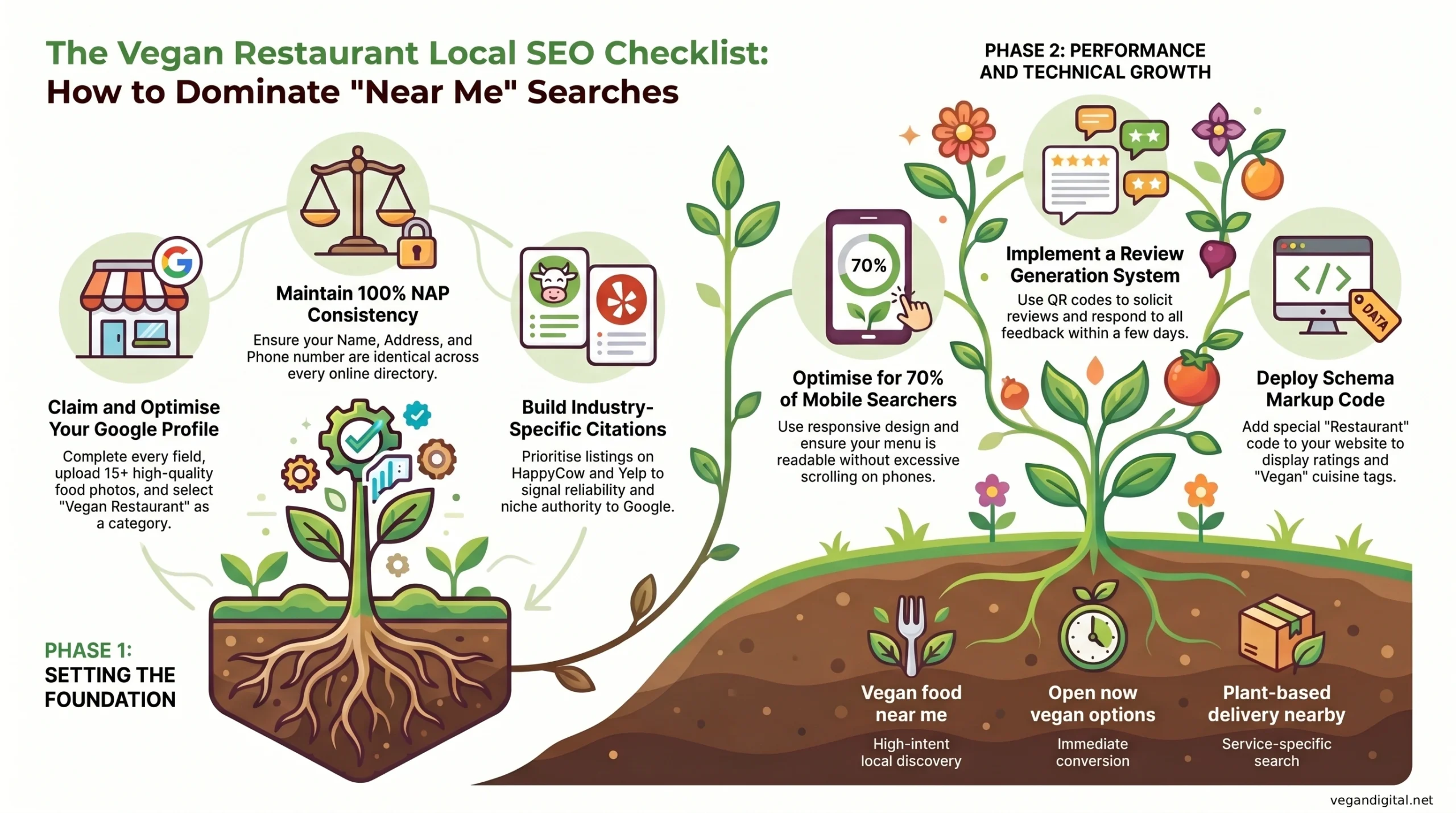
Actionable Steps
Step 1: Claim and Optimize Your Google Business Profile
- Go to Google Business Profile and sign in or claim your business
- Fill out every field completely: business name, address, phone, website, hours
- Add high-quality photos (at least 10 to 15) of your food, space, and team
- Write a compelling description that mentions vegan, plant-based, or vegetarian options
- Select “Restaurant” or “Cafe” as your primary category and add vegan-related secondary categories
- Enable messaging, booking, or ordering features if they apply to your business
- Set your service area if you deliver beyond your location
Step 2: Establish and Maintain NAP Consistency
- Write down your official Name, Address, and Phone number exactly as you want it to appear everywhere
- Audit your website, Facebook, Instagram, LinkedIn, and any other platforms you use
- Check every directory where you appear (Google, Yelp, HappyCow, TripAdvisor, etc.)
- Update any inconsistencies immediately
- Create a simple spreadsheet and do a consistency check every three months
- Whenever you change your phone number or address, update everywhere at the same time
Step 3: Get Listed in Local Citations
- Claim or create your profile on HappyCow (the most important one for vegan businesses)
- Claim your profiles on Yelp, TripAdvisor, and other major review platforms
- Identify 5 to 10 other directories relevant to your area and food type
- Submit your business information with NAP consistency
- Verify your information when each platform sends a verification email
- Review the listings after a week to make sure everything displays correctly
Step 4: Build a Review Generation System
- Train your team to ask every customer for a Google review
- Create printed signage with a QR code linking to your Google review page
- Add review request links to your email receipts and delivery packaging
- Set a calendar reminder to review your reviews and respond to them at least once a week
- Keep a spreadsheet of review trends so you can identify patterns to address
Step 5: Optimize for Mobile
- Test your website on Google PageSpeed Insights and aim for a score above 75
- Ensure your menu is readable and organized on mobile devices
- Make sure your phone number is clickable and your hours are visible without scrolling
- Test the mobile user experience yourself by visiting your site on your phone
- Compress images to improve loading speed
- If you take online orders, simplify the mobile checkout process
Step 6: Implement Schema Markup
- Choose whether you’ll use a plugin (WordPress, Wix, Squarespace) or hire a developer
- Add LocalBusiness schema with your exact name, address, phone, and hours
- Add Restaurant schema and identify “Vegan Cuisine” as your cuisine type
- Add AggregateRating schema to display your reviews
- Test your schema using Google’s Rich Results Test tool
- Ask your developer to verify the schema is in the page header
Step 7: Monitor and Improve
- Log into Google Business Profile weekly to check messages and new reviews
- Track your performance in Google Business Profile Insights (views, actions, clicks)
- Set a monthly calendar reminder to respond to reviews
- Set a quarterly reminder to audit your NAP consistency
- Track which menu items or dishes get mentioned most in reviews
- Use customer feedback to improve your business
Conclusion
Local SEO for vegan restaurants isn’t complicated, but it does require attention to detail and consistency. You’re essentially making sure Google understands exactly what you are, where you are, and why customers should choose you.
When someone nearby is hungry for vegan food, they search for it on their phone. The strategies in this checklist make sure they find you. NAP consistency, local citations, review management, mobile optimization, and schema markup work together to build authority in your local market.
This isn’t a one-time project. Local SEO is ongoing. Every month, a few new things will change. A review will come in. Your hours might shift seasonally. A competitor might get a new listing. The businesses that stay ahead are the ones that monitor their presence and make small improvements continuously.
You now have the checklist. You know what to do. Start with Step 1 (optimize your Google Business Profile), move through each step in order, and by the time you’ve completed all seven steps, your restaurant will be positioned to capture local searches consistently.
If you want to accelerate your results and avoid the learning curve, Vegan Digital specializes in vegan SEO service. We handle the audits, the citations, the review strategies, and the technical work so you can focus on running your business. But whether you do this yourself or work with an agency, the important thing is that you start now. Your plant-based customers are already searching. Make sure they find you.