Schema Markup for SEO & GEO: The Vegan Business Guide to Rich Results
Schema markup helps search engines understand your pages, and it can increase organic traffic by making your listings clearer and more clickable.
If you run a vegan restaurant, cruelty free beauty brand, ethical fashion store, or plant based ecommerce site, the value is practical. Schema markup can improve eligibility for rich results, clarify product and business information, and make your search listings more useful to buyers.
Schema markup also matters for AI visibility, not just traditional search. GEO, Generative Engine Optimization, is part of that shift, because AI driven search and answer engines need clean, structured signals to understand and surface the right business information. Google, Bing, ChatGPT, and other AI systems rely on clear page structure and machine readable context to interpret what your business does, what you sell, where you operate, and which content answers a specific question.
For vegan businesses, that matters because AI generated answers often compress information fast. If your products, services, locations, and FAQs are marked up clearly, you improve the chances that search engines and AI systems interpret your content correctly, even though schema alone does not guarantee mentions, citations, or rankings.
What Is Schema Markup in SEO?
Schema markup in SEO is structured data added to a page so search engines can understand key business, product, and content details more accurately.
- It is usually added as JSON LD, the format Google prefers because it is easier to manage and test than older formats. Google explains the basics in its Introduction to Structured Data.
- The vocabulary comes from Schema.org, which defines entities like businesses, products, restaurants, recipes, and FAQ pages.
- Schema markup does not directly raise rankings. It can improve how your page appears in search through rich results, which may increase click through rate.
- For vegan businesses, this matters because customers often compare several options fast. Clear details like hours, price, stock status, reviews, and menus reduce friction before the click.
Quick takeaway: Schema markup will not rank a weak page, but it can make a strong page easier to understand and easier to click.
Which Schema Types Matter Most for Vegan Businesses?
The right schema type depends on your business model and page type, not the word vegan alone.
- Plant based restaurants and cafes should focus on local business schema markup and restaurant details like address, opening hours, menu, and contact information. Useful references include LocalBusiness schema, Restaurant schema, and Google’s local business structured data guidelines.
- Vegan food brands, cruelty free cosmetics, and ethical fashion stores should prioritize product schema markup on product pages. This supports details like price, stock status, ratings, and offers. Google’s product structured data guide and Product schema specification are the main references.
- Content heavy brands can use FAQ schema markup on valid question pages, and recipe schema markup if recipes are a real part of the business. See FAQPage schema and Google’s FAQ structured data guidelines.
- If time is limited, start with the pages closest to revenue, your location pages, top product pages, and FAQ pages.
What people miss: Vegan is not a schema type. Search engines first need the page function, such as Restaurant, Product, Organization, FAQPage, or Recipe.
How to Add Schema Markup to Your Website Without Overcomplicating It
Add schema markup to your website by matching each important page to the right schema type, inserting JSON LD, and validating it before and after publishing.
- Start with page intent, not code. A homepage may need Organization or LocalBusiness markup. A product page may need Product markup. A location page may need LocalBusiness or Restaurant markup.
- Use Google’s rich results gallery to see supported result types, then confirm the vocabulary in Schema.org.
- If your site uses Shopify, WordPress, or another CMS, some schema may already exist. Do not stack plugins or duplicate fields. Duplicate markup is common after redesigns.
- A simple rollout works best for most founders, homepage, contact or location page, top product pages, then one FAQ page.
Copy and Paste Schema Markup Setup
Use the template below by matching it to your page type, replacing the sample details with your real business information, and then adding the code to the correct page.
Option 1, LocalBusiness schema for a vegan shop, cafe, or service business
Use this on your homepage or location page if you run a vegan restaurant, cafe, grocery store, salon, clinic, or local service business.
<script type="application/ld+json">
{
  "@context": "https://schema.org",
  "@type": "LocalBusiness",
  "name": "Green Roots Vegan Cafe",
  "image": "https://www.example.com/images/storefront.jpg",
  "url": "https://www.example.com/",
  "telephone": "+1-555-123-4567",
  "priceRange": "$$",
  "address": {
    "@type": "PostalAddress",
    "streetAddress": "123 Plant Street",
    "addressLocality": "Toronto",
    "addressRegion": "ON",
    "postalCode": "M5V 2T6",
    "addressCountry": "CA"
  },
  "openingHours": [
    "Mo-Fr 08:00-18:00",
    "Sa-Su 09:00-17:00"
  ],
  "sameAs": [
    "https://www.instagram.com/yourbrand",
    "https://www.facebook.com/yourbrand"
  ]
}
</script>
What to replace
- Replace the business name, phone number, URL, and image URL.
- Replace the address with your exact public business address.
- Replace opening hours with the hours shown on your website and Google Business Profile.
- Remove any field you cannot keep updated.
Option 2, Restaurant schema for a vegan restaurant or cafe
Use this on a restaurant location page if your business serves food and has a public menu.
<script type="application/ld+json">
{
  "@context": "https://schema.org",
  "@type": "Restaurant",
  "name": "Green Roots Vegan Cafe",
  "url": "https://www.example.com/",
  "image": "https://www.example.com/images/dining-room.jpg",
  "telephone": "+1-555-123-4567",
  "servesCuisine": "Vegan",
  "menu": "https://www.example.com/menu",
  "acceptsReservations": "True",
  "address": {
    "@type": "PostalAddress",
    "streetAddress": "123 Plant Street",
    "addressLocality": "Toronto",
    "addressRegion": "ON",
    "postalCode": "M5V 2T6",
    "addressCountry": "CA"
  },
  "openingHours": [
    "Mo-Fr 08:00-18:00",
    "Sa-Su 09:00-17:00"
  ]
}
</script>
What to replace
- Add your real menu URL.
- Only keep
acceptsReservationsif customers can actually book. - Use this only on pages that clearly represent the restaurant location.
Option 3, Product schema for a vegan ecommerce product page
Use this on an individual product page, not on category pages.
<script type="application/ld+json">
{
  "@context": "https://schema.org",
  "@type": "Product",
  "name": "Vegan Protein Powder Vanilla",
  "image": [
    "https://www.example.com/images/protein-powder.jpg"
  ],
  "description": "Plant based vanilla protein powder made without dairy or animal ingredients.",
  "brand": {
    "@type": "Brand",
    "name": "Vegan Fuel"
  },
  "sku": "VFP-001",
  "offers": {
    "@type": "Offer",
    "url": "https://www.example.com/products/vegan-protein-powder-vanilla",
    "priceCurrency": "USD",
    "price": "29.99",
    "availability": "https://schema.org/InStock",
    "itemCondition": "https://schema.org/NewCondition"
  }
}
</script>
What to replace
- Use the exact product name, description, SKU, image, product URL, currency, and live price from the page.
- Update stock status whenever inventory changes.
- Do not use this code on collection, shop, or category pages.
Option 4, FAQPage schema for a real FAQ section
Use this only if the page visibly shows the same questions and answers to users.
<script type="application/ld+json">
{
  "@context": "https://schema.org",
  "@type": "FAQPage",
  "mainEntity": [
    {
      "@type": "Question",
      "name": "Do you use only vegan ingredients?",
      "acceptedAnswer": {
        "@type": "Answer",
        "text": "Yes, all products are made without animal ingredients."
      }
    },
    {
      "@type": "Question",
      "name": "Do you ship across Europe?",
      "acceptedAnswer": {
        "@type": "Answer",
        "text": "Yes, we ship to most European countries. Delivery times vary by location."
      }
    }
  ]
}
</script>
What to replace
- Keep the wording consistent with the visible FAQ on the page.
- Do not add answers in schema that users cannot see on the page.
- Only use this on a page with a real FAQ section.
How to Add the Code to Your Site
Add the schema markup code inside the HTML of the specific page it belongs to, ideally in the <head> section or through your SEO or theme settings if your platform supports it.
- WordPress, add it with a custom code field in your SEO plugin, theme settings, or header injection tool.
- Shopify, add it in the theme code or through a structured data app, but check for existing product schema first.
- Webflow, Squarespace, Wix, or custom sites, use the page level custom code area or ask your developer to place the JSON LD script in the page head.
- Add one relevant schema type per page first, then expand once the basics are working cleanly.
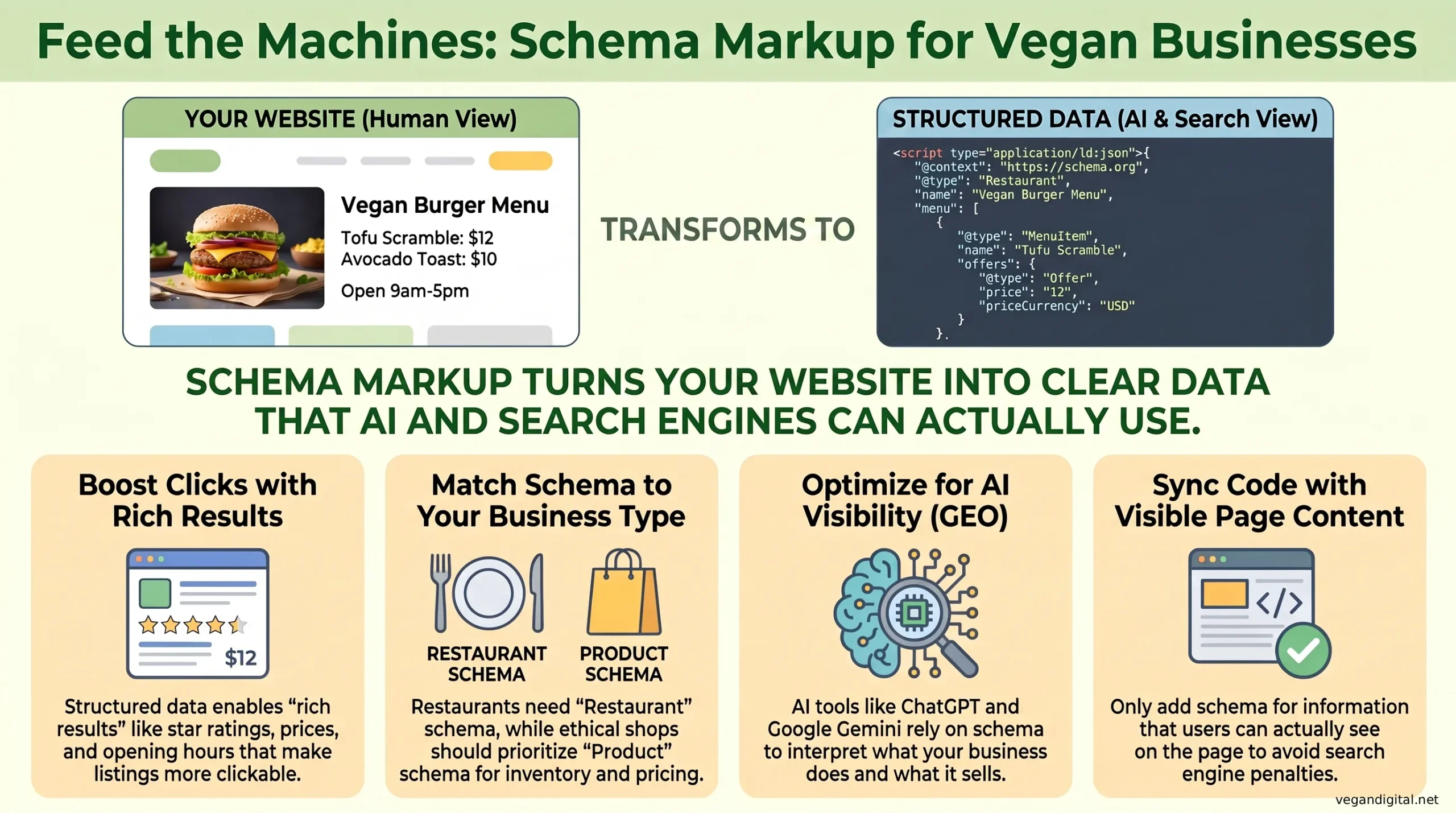
The Rich Results That Actually Help Organic Traffic
The rich results most likely to help vegan businesses are local business enhancements, product details, and FAQ related improvements where eligible.
- For local brands, structured data can support business details that improve trust and discovery in search.
- For ecommerce, product schema markup can surface price, availability, and review related information. On crowded results pages, that extra context can improve click quality.
- For content led brands, FAQ and recipe related markup can help search engines understand page purpose, but not every marked up page will earn a rich result.
- Use Google’s Rich Results Test to check eligibility, then track page performance in Google Search Console.
Why Schema Markup Is Important for AI Visibility
Schema markup is important for AI visibility because it gives AI systems clearer, structured context about your business, products, services, and content.
- AI tools do not read pages the same way humans do. They look for clear signals about entities, topics, relationships, and page purpose.
- Schema helps reduce ambiguity. If you sell vegan protein powder, run a plant based restaurant, or publish cruelty free skincare FAQs, structured data helps define exactly what that page represents.
- This matters for Google and Bing search features, and it also supports machine readability for AI driven experiences that summarize, compare, and recommend businesses or products.
- Schema is especially useful when your page could otherwise be misunderstood. Vegan businesses often have mixed intent pages, such as educational content, product pages, location pages, and brand pages, which can blur meaning without structured data.
- Schema does not guarantee that ChatGPT or any AI assistant will cite your business. What it does is improve content clarity, which supports stronger interpretation alongside good page copy, strong topical relevance, and accurate on page information.
For business owners, the practical takeaway is simple. Schema markup helps your site speak more clearly to both search engines and AI systems. That makes it a useful part of a broader visibility strategy, especially when your goal is to be understood correctly, not just indexed.
What This Can Fix, and What It Cannot Fix
Schema markup can fix ambiguity, but it cannot fix weak business fundamentals.
- It can help search engines understand what a page is about, whether that is a restaurant, a product, a recipe, or a FAQ.
- It can improve search presentation when the markup matches what users can actually see on the page.
- It cannot make a low demand or weak page rank by itself. It also cannot fix slow pages, poor site structure, thin content, or weak local SEO.
- It will not solve operational problems like outdated stock status, old opening hours, discontinued products, or menu changes that never get updated on the website.
Reality check: The code is often the easy part. Keeping business data accurate is usually the harder part.
Matching Schema to Vegan Customer Intent
The strongest schema strategy matches how vegan customers search and decide.
- A vegan restaurant often depends on local intent. People search nearby, check hours, scan the menu, and make a quick choice. LocalBusiness or Restaurant markup supports that path.
- A cruelty free skincare or ethical fashion brand often depends on comparison intent. Searchers want product details, availability, reviews, ingredients, and trust signals. Product markup supports those needs.
- A plant based brand publishing recipes or ingredient explainers often attracts informational intent. Schema helps clarify the content type, but the business value comes from connecting that content to products or services.
- Most businesses should not mark up every page first. Start with the pages closest to buying intent or local action.
Schema Markup Setup Checklist for Vegan and Plant Based Businesses
Use this checklist to implement schema markup for SEO without turning it into a long technical project.
- List your highest value pages, homepage, location pages, product pages, FAQ pages, and recipe pages if relevant.
- Match each page to one schema type first, Organization, LocalBusiness, Restaurant, Product, FAQPage, or Recipe.
- Add JSON LD only where the visible page content supports it.
- Validate with Google’s Rich Results Test and the Schema Markup Validator.
- Monitor results in Google Search Console.
- Update markup whenever prices, stock status, opening hours, menu links, or product details change.
- Expand only after the first batch is clean. A small accurate rollout is better than a messy site wide launch.
If you want expert help turning technical improvements into a stronger growth system, working with a vegan SEO agency can help you avoid duplicate markup, wasted effort, and missed revenue pages.