
Gemini AI for Google Business Profile – Small Businesses
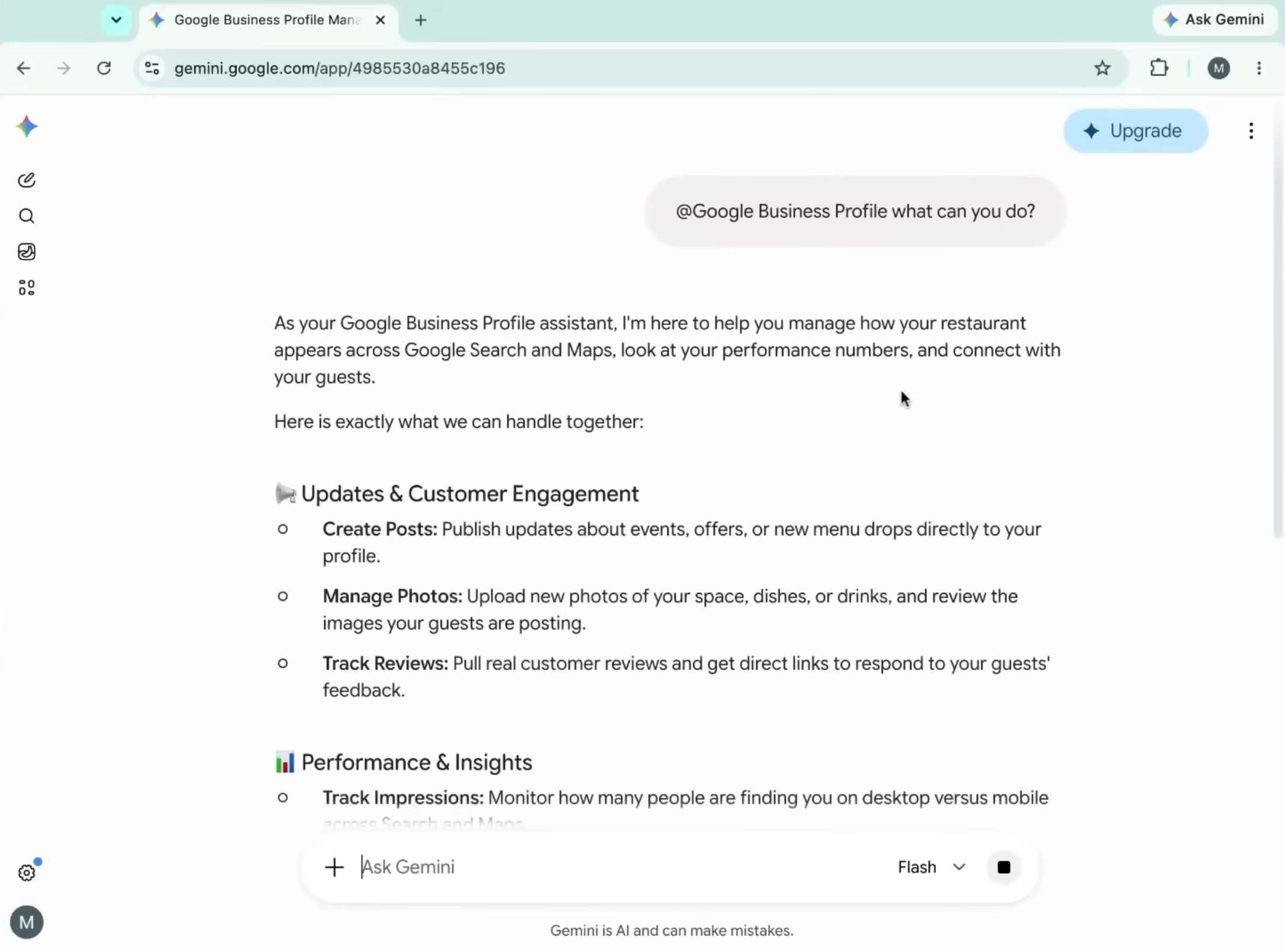
Gemini AI for Google Business Profile connects the Gemini web app to one verified Business Profile, helping small business owners review performance, understand customer feedback, draft replies, create posts, and update selected business information.
The integration can help with:
- Search and Maps performance metrics
- Customer reviews and recurring feedback themes
- Business hours, descriptions, attributes, links, and menus
- Google Business Profile posts
- Local marketing ideas and content planning
- Missing or outdated profile information
Google is releasing these features gradually, so access and available actions may vary by account, language, and region. Check the official Google Business Profile Help documentation before building the tool into a regular workflow.
How to connect Gemini to Google Business Profile
You can connect Gemini to Google Business Profile by signing into the Gemini web app with the same personal Google Account that manages one verified profile.
- Go to gemini.google.com.
- Sign in with the Google Account linked to your Business Profile.
- Ask Gemini a question about your business.
- If Gemini does not select the correct app, type @Google Business Profile in the prompt.
- Follow the on-screen instructions to grant access.
- Confirm that Keep Activity is switched on.
The current access model is limited. The account must belong to someone who is at least 18 years old and must manage only one verified Business Profile. Work, school, and Google Workspace accounts may not be supported for this connection.
What Gemini can do with Google Business Profile
Gemini can analyze profile performance, support customer communication, suggest improvements, and complete selected profile updates.
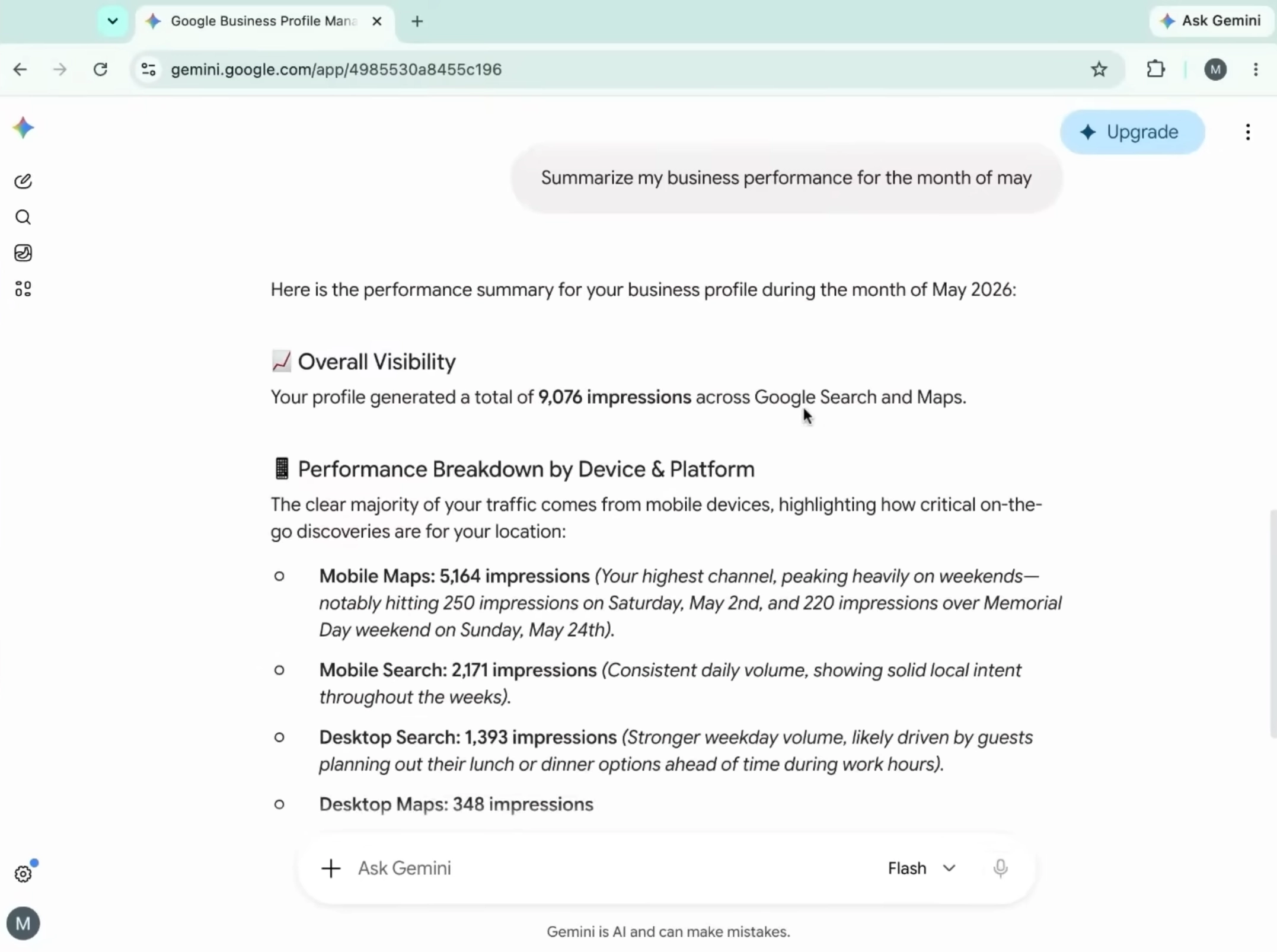
Performance analysis. Ask for impressions, website clicks, direction requests, bookings, calls, and other customer actions over a specific period.
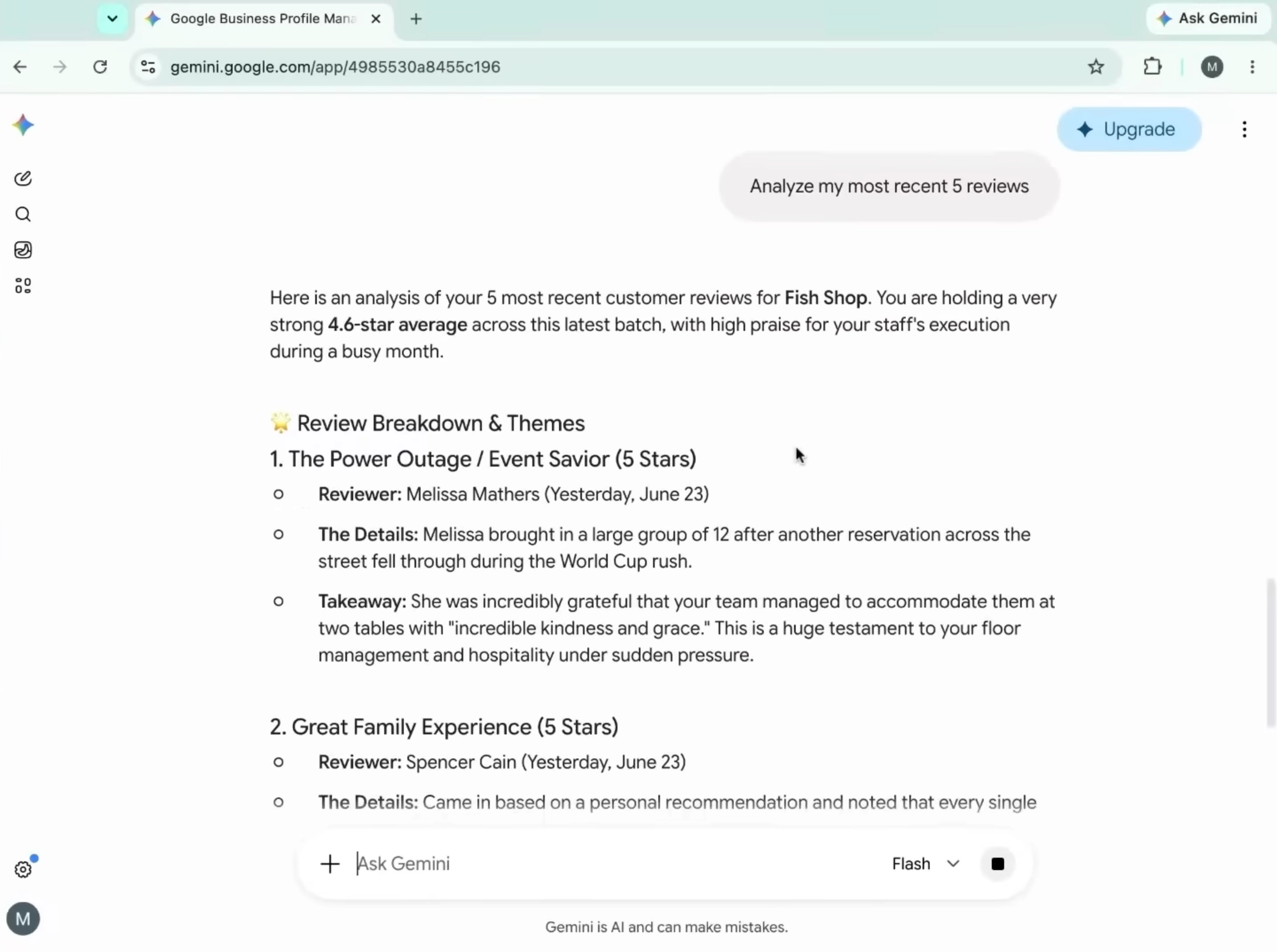
Review management. Request a summary of common complaints, positive themes, unanswered reviews, or changes in customer sentiment.
Reply drafting. Ask Gemini to write a warm, specific response that refers to the customer’s actual experience. Always review the draft before publishing it.
Profile updates. Gemini may help review or modify hours, descriptions, contact details, action links, attributes, menus, and some media.
Post creation. It can brainstorm, create, schedule, publish, or delete eligible Update, Offer, or Event posts, depending on the account and available permissions.
Profile audits. Ask Gemini to identify missing information, such as holiday hours, relevant attributes, exterior photos, or a clearer business description.
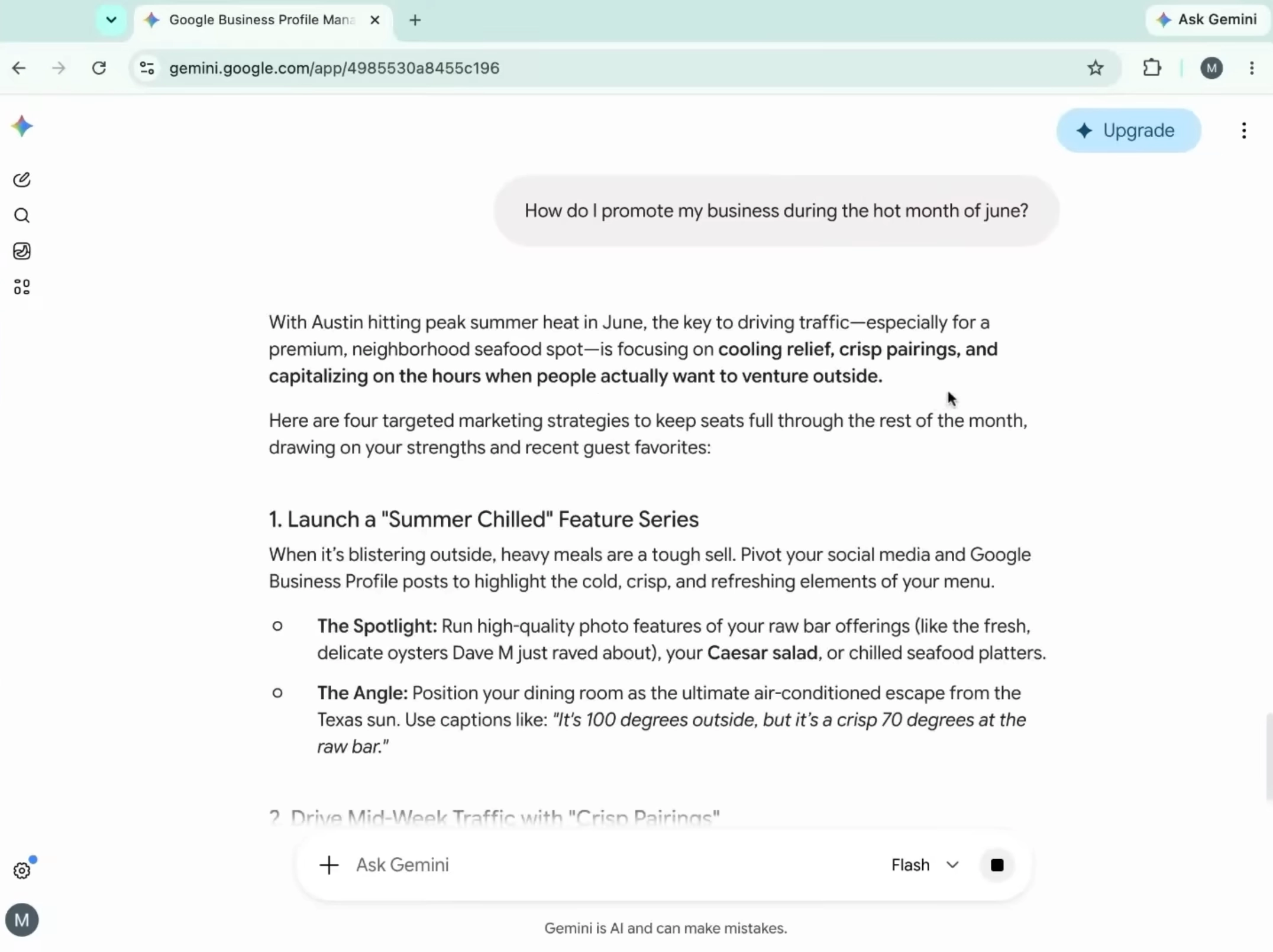
For example, a restaurant could ask, “Review my profile for missing information before the holiday weekend and list the three updates most likely to prevent customer confusion.”
The practical value is simple. Gemini does not replace business judgment. It makes routine checks easier to complete and helps turn profile data into consistent marketing and customer service actions.
Business Notebooks for long term planning
Business Notebooks give Gemini a persistent workspace for business information, chats, websites, and other sources you choose to provide. This means you do not need to repeat the same background details in every prompt.
A Business Notebook can support small business marketing by helping with:
- Needs attention tasks, such as unanswered reviews, missing hours, incomplete descriptions, and outdated profile details.
- Content planning, including a seven day calendar with captions, offers, customer segments, and a reason for each post.
- Scenario planning, such as comparing a limited product launch with an evergreen offer.
- Ongoing context, using your website, customer feedback, profile data, and approved business documents.
- Proactive suggestions, including content ideas, operational improvements, and responses to customer trends.
To create one, open Gemini on a computer, connect Google Business Profile, and select Connect when the Business Notebook option appears. You may also need to confirm your business website URL.
A useful prompt is, “Create a seven day content calendar for my Thrissur café. Use my customer review themes, avoid discounts below 10 percent, and include one post that promotes weekday visits.”
Only add accurate, current, and necessary information. Treat projected figures as estimates, not guaranteed forecasts.
Better prompts for Google Business Profile optimization
The best prompts include your location, audience, offer, constraints, and desired outcome. Vague prompts usually produce generic marketing copy.
Try these examples:
- “Analyze my last 30 days of profile performance. Separate visibility metrics from customer action metrics and identify two practical next steps.”
- “Summarize my latest 20 reviews into three strengths, three recurring concerns, and one operational change.”
- “Draft three replies to this review. Keep each under 70 words, sound human, and do not promise anything we cannot deliver.”
- “Audit my business description for clarity, local relevance, and accuracy. Do not add services we do not offer.”
- “Suggest five Google Business Profile posts for July aimed at increasing midweek visits. Use our real opening hours and current menu only.”
- “Compare a one week limited offer with an evergreen offer. List operational risks, likely customer response, and the data I should track.”
These prompts support Gemini AI for small business marketing without asking the tool to invent prices, availability, testimonials, or business policies.
What Gemini means for local SEO
The integration does not automatically make a profile rank first on Google Maps. AI for local SEO works best when it helps a business maintain accurate information, respond to customers, publish useful updates, and act on real performance data.
The largest gains often come from basic consistency:
- Correct opening and holiday hours
- Accurate contact details and booking links
- Relevant categories and attributes
- Recent, genuine photos
- Clear service descriptions
- Timely review responses
- Posts that reflect real offers or events
A business that cannot fulfil an advertised offer, update stock information, or respond to customers promptly will not solve the underlying problem with better prompts. Local visibility depends on relevance, trust, customer experience, and competition, not content volume alone.
What Gemini can fix and what it cannot
Gemini can reduce repetitive work and expose overlooked profile issues. It cannot replace accurate information, sound decisions, good service, or reliable operations.
Gemini can help with:
- Inconsistent posting
- Slow first drafts for review responses
- Recurring complaints that are difficult to spot manually
- Forgotten profile fields and seasonal updates
- Confusing performance data
- Local promotion ideas
- A disconnected workflow between profile insights and marketing
Gemini cannot fix:
- Poor service, late deliveries, or unresolved complaints
- Incorrect information in source documents
- Low demand caused by pricing, location, or weak positioning
- A lack of staff to fulfil new demand
- Fake reviews or misleading claims
- Competitive disadvantages that require a wider strategy
Treat Gemini as an execution aid. A business owner should verify every change, especially hours, prices, menus, availability, legal claims, and customer specific details.
Privacy and operational safeguards
Before uploading sensitive material, review Google’s current Gemini privacy and connected app guidance. Do not add information that is unnecessary for the task.
Use these safeguards:
- Remove bank details, passwords, identity documents, and unnecessary personal data.
- Upload only the pricing sheet or business plan section Gemini needs.
- Check whether staff have permission to access uploaded documents.
- Require human approval for profile edits and public replies.
- Keep a record of important changes to hours, menus, and offers.
- Compare Gemini’s summaries with original reviews and performance data.
A notebook becomes useful when it contains accurate, current context. It becomes risky when outdated documents are treated as business truth.
Availability and rollout limits
The integration is currently intended for eligible users managing one verified profile through a personal Google Account. Availability is limited by region and language, and the rollout is not currently available in the United Kingdom or European Economic Area according to the draft’s stated rollout conditions.
Access may change as Google expands the service. Multi-location support, agency workflows, Google Workspace access, and mobile availability may develop later.
At present, Gemini can draft a review response, but the business owner should review and publish it manually in Google Business Profile. This extra step helps prevent generic, inaccurate, or inappropriate replies.
Immediate implementation checklist
- Confirm that your business has one verified Google Business Profile.
- Sign into Gemini with the linked personal Google Account.
- Type @Google Business Profile and complete the connection.
- Request a 30 day performance summary.
- Review search visibility, customer actions, and unanswered reviews.
- Run an audit for hours, links, categories, attributes, photos, and description.
- Create two accurate posts based on real offers or events.
- Edit review replies for authenticity, then publish them manually.
- Create a Business Notebook with useful, non sensitive context.
- Recheck performance and customer feedback after 30 days.
For owners who lack time to verify AI output and maintain a consistent local marketing workflow, specialist support can turn Gemini from an occasional experiment into a controlled business process.